

A tender evaluation criteria and weighting xls file helps buyers compare bids against the same published requirements. Set out each criterion, its weight and a consistent scoring method before inviting suppliers. Then record scores, supporting evidence and the reasons for the final decision. This guide explains how to build and check a practical workbook without letting the spreadsheet make the decision for you.
What Should a Tender Evaluation Criteria and Weighting XLS Include?
A useful workbook is more than a list of scores. It should show what matters, how much it matters and how evaluators reached their conclusions. Keep the structure simple enough for someone outside the evaluation team to follow later.
- Instructions: the tender name, version, evaluator roles, scoring scale and any rules for exclusions or minimum thresholds.
- Criteria: the questions or requirements being assessed, their weights and the evidence suppliers should provide.
- Individual assessments: each evaluator’s score and rationale, with a reference to the relevant bid response.
- Moderation record: agreed scores, differences of opinion and the reasons for resolving them.
- Summary: weighted totals, eligibility outcomes and the recommendation for a named decision-maker to consider.
For UK public procurement, check the rules and guidance that apply to your organisation and procurement before designing the process. The UK government’s Procurement Act guidance collection is a useful starting point. Private buyers should also follow their own policies and any commitments made in the tender documents.
Decide who owns the workbook and where its controlled copy will be stored. Multiple uncontrolled versions can make it difficult to establish which criteria were issued or which scores were agreed.
Give each criterion a consistent reference in the tender and workbook. Use the same references in scoring sheets and moderation notes so reviewers can trace a score back to the question and response without relying on a row number that may change.
1. Choose Criteria That Reflect the Contract
Start with the outcome you need, not a standard list copied from another tender. A facilities contract may depend on response times and staffing cover; a software purchase may depend on implementation, accessibility and support. Price matters in both, but the evidence needed to judge value will differ.
Write each criterion so an evaluator can connect it to a specific supplier response. For example, instead of a broad heading such as “quality”, ask suppliers to explain their delivery approach, escalation route and proposed checks. Identify which parts of that answer will be scored.
Separate essential requirements from comparative criteria. An essential requirement might be a stated delivery location or a mandatory response format. If it is a pass-or-fail condition, explain the consequence of failing it. A weighted criterion compares the quality or value of eligible responses; it should not quietly become a new pass-or-fail test after bids arrive.
Avoid scoring the same benefit twice. If staff experience is assessed under both service quality and implementation, define the distinct evidence each criterion covers. For more detail on designing defensible questions, see the step-by-step guide to tender evaluation criteria.
Before publication, read each question alongside its scoring description. Check that the requested evidence gives evaluators enough information to apply the criterion and that suppliers can tell which aspects of their answer matter. Remove overlapping wording or explain the distinct purpose of each question.
2. How Should You Allocate Weights?
Weights express the relative importance of criteria in the award decision. Agree them with the people responsible for the contract before publishing the tender. They should reflect the consequences of a weak response as well as the value of a strong one.
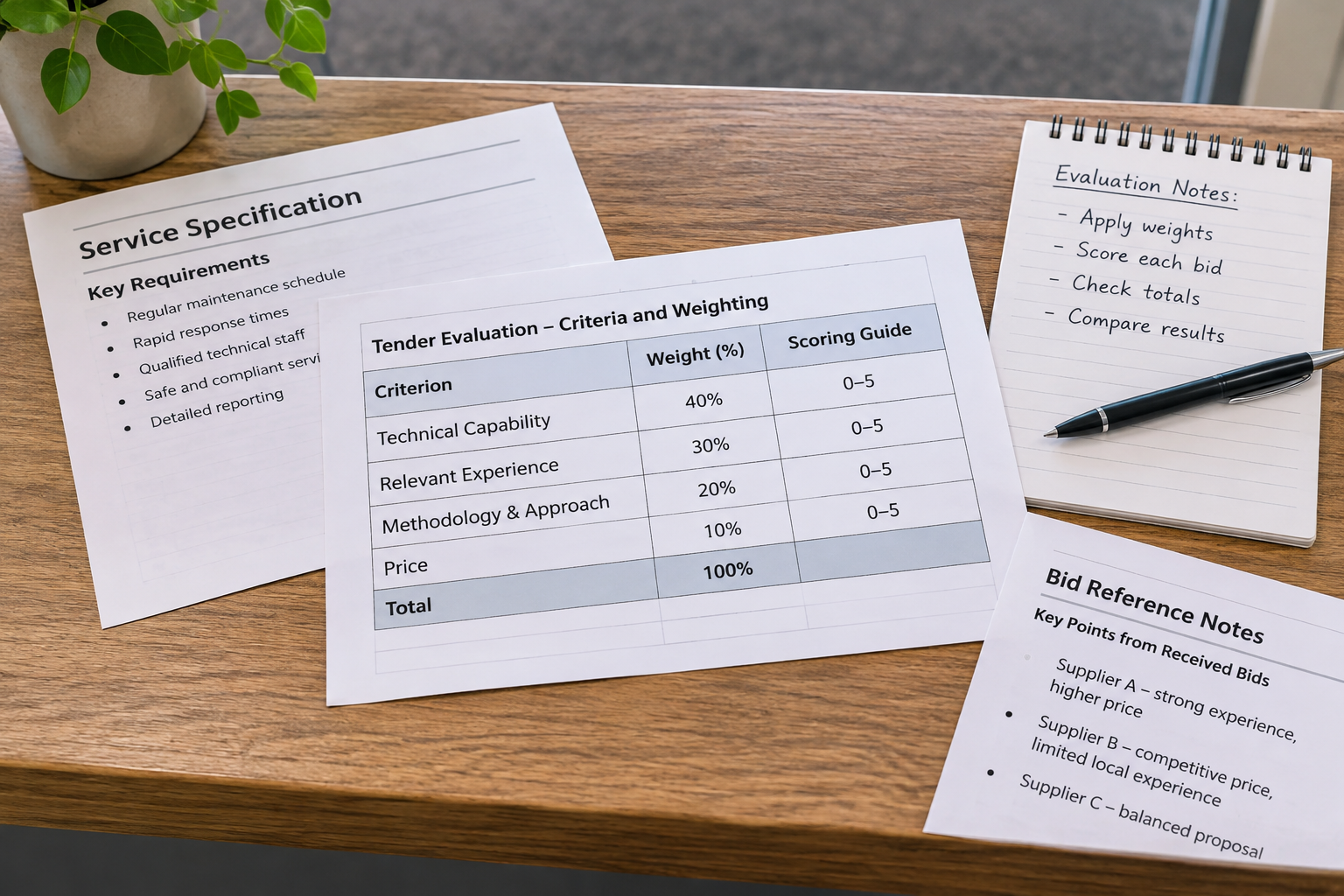
The following is a hypothetical example for a routine service contract, not a recommended allocation for every purchase. The weights total 100%. No supplier scores or results are implied.
| Criterion | Example weight | What to assess | Possible evidence |
|---|---|---|---|
| Price | 35% | Comparable cost for the defined scope | Completed pricing schedule and stated assumptions |
| Service delivery | 30% | How the proposed service meets the specification | Method statement and service schedule |
| Implementation | 20% | Practicality of mobilisation and handover | Plan, milestones and responsibilities |
| Risk and continuity | 15% | How likely disruptions will be managed | Continuity approach and escalation arrangements |
Test the allocation with colleagues who understand the requirement. Ask whether a bid with a low price but a weak delivery approach could still win, and whether that would reflect the organisation’s priorities. If not, revisit the criteria, weights or any justified minimum quality thresholds before issuing them.

If you use subcriteria, state whether their weights are percentages of the whole tender or shares of a parent criterion. For instance, two equally weighted subcriteria under a 20% parent each contribute 10 percentage points to the overall result. Do not add parent and subcriterion weights together.
Try a few hypothetical score combinations when testing weights. Compare a stronger delivery response with a lower-priced response and examine how the totals change. The exercise is a check on the intended balance, not a reason to adjust weights after seeing actual bids.
3. How Do You Set Up Scores and Formulas?
Use a scoring scale with descriptions that distinguish levels of response. A simple zero-to-five scale can work if the tender explains what each score means. Tailor the descriptions to the requirement and make clear how missing, incomplete and unsupported answers will be treated.
- 0: No relevant response or evidence provided.
- 1: Major gaps; the response gives little confidence that the requirement can be met.
- 2: Some relevant information, but significant gaps remain.
- 3: The response meets the requirement with adequate supporting detail.
- 4: A strong response with clear, relevant supporting detail.
- 5: An exceptional response that exceeds the stated requirement in a relevant, evidenced way.
These are illustrative anchors, not universal definitions. Tell suppliers whether a score above “meets” is available and what relevant added value looks like. Do not reward extras that were not connected to the published criterion.
For a workbook using percentage-formatted weights in cells B2:B5 and scores out of five in C2:C5, calculate each row’s weighted contribution with =B2*C2/5. Format the result as a percentage and copy the formula down. Add the contributions to obtain the total percentage score. Alternatively, use =SUMPRODUCT(B2:B5,C2:C5)/5 for the total; see Microsoft’s SUMPRODUCT guidance.
Check the weight total with =SUM(B2:B5); it should show 100%. Enter weights as percentages, such as 35%, rather than mixing 35 and 0.35 in the same range. Keep raw scores, weighted contributions and totals clearly labelled so reviewers can see what each number represents.
Test the formulas with a dummy case before using live bids: if every criterion scores five out of five and weights total 100%, the overall score should be 100%. If every score is zero, the total should be zero. Also check a mixed-score case by hand, and investigate any discrepancy.

Blank cells need special attention. Some spreadsheet calculations can treat blanks like zero, making an unfinished evaluation look complete. Use a separate completion check and do not rely on the total until every required score and rationale has been entered.
In the mixed-score test, check individual contributions as well as the final total. For example, a score of three out of five against a 20% weight contributes 12 percentage points. Confirm that copied formulas refer to the intended row and that the total includes every criterion once.
4. How Should Price Be Compared?
Start by asking every supplier to price the same scope and period. State the units, quantities, currency, treatment of VAT, optional items and any assumptions needed for comparison. Where quantities are estimates, explain how they will be used and avoid presenting an estimate as a guaranteed purchase volume.
One possible method gives the lowest eligible comparable price the maximum price score and calculates other scores as lowest comparable price ÷ supplier’s comparable price × maximum price score. This is only an example: it must be suitable for the purchase, stated in advance and checked for zero or non-comparable prices. If a price is unclear, follow the published clarification process rather than changing it silently.
Consider whether a simple total captures the costs that matter. A low initial fee may sit alongside ongoing support, implementation or exit costs. Include such elements in the pricing schedule and evaluation method where they are relevant and can be compared fairly.
Document how you will handle omissions, qualifications and unusually low or high prices. Do not assume a low price proves a supplier cannot deliver, or that a high price proves better quality. Seek clarification where appropriate and apply the same published approach consistently.
Keep the submitted pricing schedule alongside the comparison workings. Show how each evaluated total was assembled from the requested items and quantities, and record any clarification that affects the comparison. This makes it easier to check that the same scope and assumptions have been used for each bid.
5. Protect the Process Before Bids Arrive
Finalise the criteria, weights, scoring anchors, price method and any thresholds before inviting responses. Give suppliers the information they need to understand how their bids will be evaluated. If the tender changes, control the version and communicate the change to all affected suppliers under the applicable process.
Restrict access to the master workbook and protect formula cells against accidental edits. Spreadsheet protection is a safeguard against mistakes, not a substitute for access controls or secure storage. Keep a separate record of who can open bid materials and when.
Sealed bidding adds an important procedural control: bids remain unavailable for evaluation until the deadline, rather than being informally reviewed as they arrive. Agree how late submissions, deadline extensions and opening authority will be handled. Read more about the sealed bidding process.

If managing separate files and bid access is becoming difficult, TenderLock can help run a sealed tender alongside structured criteria and an audit trail. You can start your first live tender free, with no card required.
6. Record Evidence, Moderate Scores and Check the Decision
Ask evaluators to score independently where the process requires it. For each score, record the relevant bid section, a short explanation and any gap against the published criterion. A note such as “good answer” is rarely enough; explain what the supplier proposed and why that supports the score.
Separate the supplier’s evidence from an evaluator’s inference. If a claim is unclear, use the permitted clarification process and record the question and response. Do not fill gaps with knowledge about a supplier that is not part of the evidence you are entitled to consider.
At moderation, compare individual assessments and discuss material differences. Record the agreed score and its rationale rather than simply averaging numbers without discussion. If your organisation uses an average, define that method in advance and retain the individual records as well as the calculation.
For a useful moderation note, identify the criterion, the evidence discussed and the reason the agreed score fits the published anchor. Where evaluators initially disagreed, capture the point of difference and how it was resolved. Keep the original assessments available rather than overwriting them with the moderated result.
Before recommending an award, check eligibility outcomes, thresholds, price calculations, formula ranges and any ties. Review whether the rationale supports the scores and whether the final ranking follows the stated method. A named person or authorised group should make and record the decision; a spreadsheet total is an input, not an approval.

Retain the documents required by your policy and applicable rules: the issued criteria, bid versions, clarification records, individual assessments, moderated scores and decision record. Handle confidential and personal information in line with your organisation’s retention and access policies.
7. Watch a Spreadsheet Scoring Walkthrough
If you are new to weighted scoring, a spreadsheet demonstration can help you see how percentage weights, score ranges and totals fit together. Check any example against your own published method: a tutorial cannot decide which criteria or thresholds are appropriate for your tender.
When following a demonstration, recreate the formulas in a test copy first. Check that percentage formatting, maximum scores and cell ranges match your workbook before copying anything into a live evaluation.
Frequently Asked Questions
Can I use an XLS file rather than an XLSX file?
Yes, if your spreadsheet software supports the format and it meets your organisation’s security and compatibility requirements. The evaluation method matters more than the extension. Test formulas, formatting and permissions after saving or sharing the file, particularly if colleagues use different spreadsheet applications. Keep a controlled master and avoid editing separate copies without a reconciliation process.
Do all tender criteria need a percentage weight?
Not necessarily. Weighted award criteria contribute to the comparative score, while some requirements may be assessed on a pass-or-fail basis. Make that distinction clear to suppliers and evaluators before bids are submitted. Explain any minimum thresholds and what happens if they are not met, rather than allowing an unweighted requirement to influence scores informally.
Should evaluators see the price while scoring quality?
That depends on your published process and governance arrangements. Assessing quality separately from price can help reduce the risk of price influencing qualitative judgements, but it needs practical controls over access and moderation. Decide the sequence before bids arrive, tell evaluators what they may view and document when price information is introduced.
Can AI score bids instead of evaluators?
AI can help organise requirements, identify response passages and flag gaps for review, but its output should be checked against the actual bid and published criteria. TenderLock checks supplier responses requirement by requirement and keeps evidence available for evaluation. Named people remain responsible for the final decisions, including resolving ambiguities and recording the rationale.
What if two suppliers finish with the same score?
Follow the tie-break method stated in your tender and any applicable rules. Decide that method before publication rather than choosing one after seeing the result. Check the underlying calculations and rounding first: displayed totals can look identical even when unrounded values differ. Record the method, the outcome and the person responsible for the decision.
Ready to put your criteria into practice? Start your first live tender free with TenderLock; no card is required.